【VRChat向け】ELeFitRing ~指輪合わせ補助ツール~【Unity拡張】
- ダウンロード商品通常版[Standard Version]¥ 250
- ダウンロード商品支援版[Support Version]¥ 500
VRChatアバター向け指輪装着補助ツール「ELeFitRing」 ELeFitRing: Ring Attachment Assistant Tool for VRChat Avatars メッシュの位置が0,0,0にない指輪を合わせようとすると、位置がズレてしまう不具合を確認しました。 購入者様には申し訳ありませんが、修正までしばしお待ちください...... その他に正常に動作しないケースがあった場合教えていただけると助かります!
新バージョンを公開しました。
ver.1.3.0
動作確認済みアバター
他のアバターと比べてうまく動作しません。 メッシュの解析をOFFにすると最低限の位置合わせは行えます。 ・キプフェル ・みみのこ 動作確認しました。 ・ミルフィ ・ラズリ ・ミルティナ ・しお ・ルミナ ・リナシータ 指輪との相性によってうまくいかない場合がほとんどです。 上記のアバターに対して動作を確約するものではありません。
1. ツールについて
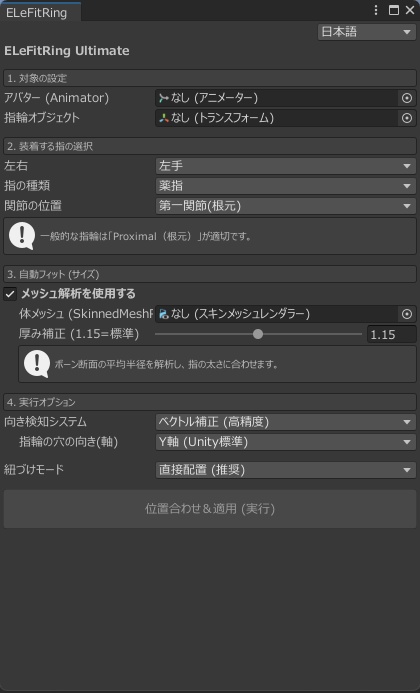
VRChatアバター改変補助ツールです。 「お気に入りの指輪を、アバターに綺麗に着けたい!」 でも、指の太さや角度に合わせて位置やサイズを微調整するのは、意外と時間がかかりませんか? ELeFitRingは、指輪をアバターの指に大まかにフィットさせるUnityエディタ拡張ツールです。 ただボーンの位置に置くだけではありません。 アバターのメッシュを解析し、指の太さに合わせて指輪のスケールまで自動調整します。 あとは細かい大きさ調整をするだけで簡単に装着が完了します。 【主な機能】 -メッシュ解析- ボーンの位置だけでなく、アバターの指の太さと指輪の内径を計算し、大まかに自動でスケール調整・位置合わせを行います。 細かい手動調整は必要です。 簡単セットアップ: アバターと指輪オブジェクトをセットして、着けたい指を選ぶだけです。 向きの自動補正: 指が曲がっている場合でも、「親ボーンから子ボーンへのベクトル」を計算し、指の流れに沿った自然な向きに指輪を回転させます。 日英対応: UIは日本語と英語を即座に切り替え可能。
2. 使い方
パッケージのインポート後、Unity上部のメニューバー Tools > ELeTools > ELeFitRing を選択します。 ツールウィンドウが開いたら、以下の設定を行います。 Avatar: シーン上のアバターをドラッグ&ドロップ。 Ring Object: アバター直下に配置された指輪のオブジェクトをドラッグ&ドロップ。 Finger Selectionで着けたい指(左右・指の種類・関節位置)を選択します。 Body Mesh: ボディメッシュが正しく選択しているか確認してください(例: Body_BaseやBody_2など) Snap & Apply ボタンを押して実行! ※ Ctrl + Z で実行前に戻すことができます。 ※ 微調整が必要な場合が多いと思いますので、実行後に手動でスケールを調整してください。
3. バリエーションについて
【通常版】 ツールをダウンロードできます。 【支援版】 中身は通常版と同じです。 開発を支援していただける方向けです。
4. 内容物
・ELeFitRing.unitypackage Unityにインポートするだけで使えます。 アバターや指輪のモデルデータは含まれません。
5. 動作環境
Unity 2022.3.22f1 にて動作確認済み Modular Avatarの事前インストールを推奨(MAモードを使用する場合のみ)
----------[利用規約]----------
本ツールを購入された時点で、本利用規約に同意したものとみなします。 利用規約の内容は変更される場合があり、最新のものが適用されます。 ◆ 許可事項 ・動画、配信などへの利用(収益化を含む) ・本ツールを使用したアバター、衣装、アクセサリーの改変、VRChat等へのアップロード ・本ツールを使用したアバター、衣装、アクセサリーの販売(ツール自体の同梱は不可) ・本ツールの改変(機能追加やUI変更など) ◆ 禁止事項 ・本ツール及びデータの再配布、販売 ・自作発言 ・特定個人や団体への誹謗中傷、政治、宗教活動を目的とした利用 ・常識の範囲を超えた行為 ◆ 著作権 ・本ツールの著作権は制作者(ELees)に帰属します。 ◆ 免責事項 ・予告なく商品や値段の更新が行われる可能性があります。 ・本ツールの使用によって生じたいかなる損害やトラブルについて、当方は一切の責任を負いません。 ・MA Bone Proxy自動設定機能(Beta)は、環境によって正しく動作しない場合があります。その場合はDirect Parentingモードをご利用ください。 ・Boothの特性上、返金対応などができません。ご了承ください。 英語版と日本語版の利用規約の間に齟齬があった場合、日本語版が優先されます。 制定日: 2026年02月15日 ご不明な点がありましたら、BOOTH、もしくはSNSのDMまでお問い合わせください。
1. About the Tool
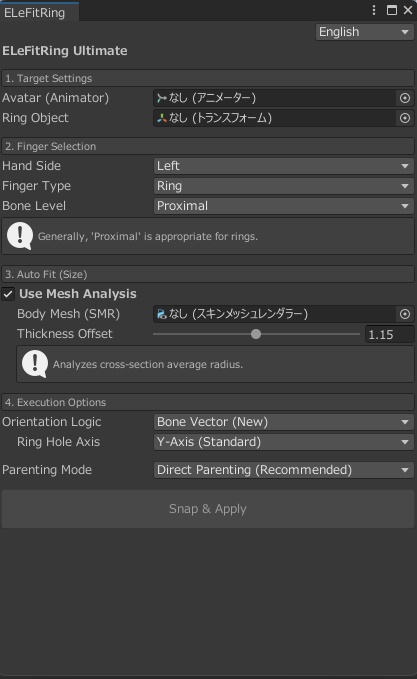
An avatar modification support tool for VRChat. "I want to put my favorite ring on my avatar perfectly!" However, isn't it surprisingly time-consuming to fine-tune the position and size to match the finger's thickness and angle? ELeFitRing is a Unity Editor extension that helps you roughly fit rings to your avatar's fingers. It does more than just place the ring at the bone position. It analyzes the avatar's mesh and automatically adjusts the ring's scale to match the finger's thickness. After that, you can finish the setup with just a few minor adjustments. Key Features Mesh Analysis: It calculates not only the bone position but also the finger thickness and the ring's inner diameter to perform rough automatic scaling and alignment. (Manual fine-tuning is still required.) Easy Setup: Simply set the avatar and ring objects, then select the finger you want to use. Automatic Orientation Correction: Even if the fingers are bent, it calculates the vector from the parent bone to the child bone to rotate the ring naturally along the finger's flow. Bilingual Support: The UI can instantly switch between Japanese and English.
2. How to Use
After importing the package, go to the Unity menu bar: Tools > ELeTools > ELeFitRing. Once the tool window opens, configure the following settings: Avatar: Drag and drop your avatar from the hierarchy. Ring Object: Drag and drop the ring object (placed under the avatar) into the slot. Finger Selection: Choose the finger (Left/Right, Finger Type, Joint Position). Body Mesh: Ensure the correct body mesh is selected (e.g., Body_Base, Body_2). Click the Snap & Apply button to execute! Note: You can undo the action with Ctrl + Z. Note: Fine-tuning is often necessary, so please adjust the scale manually after execution.
3. Variations
[Standard Version] Downloadable tool. [Support Version] Contents are the same as the Standard Version. This is for those who wish to support the developer.
4. Contents
ELeFitRing.unitypackage Ready to use upon import. (Avatar and ring model data are not included.)
5. System Requirements
Tested with Unity 2022.3.22f1 Modular Avatar pre-installation recommended (Only when using MA mode)
Terms of Use
By purchasing this tool, you are deemed to have agreed to these Terms of Use. The contents of these terms are subject to change, and the latest version will apply. Permitted Actions Use in videos and streaming (including monetization). Modification of avatars, outfits, and accessories using this tool, and uploading them to VRChat, etc. Sale of avatars, outfits, and accessories created using this tool (The tool itself cannot be bundled). Modification of this tool (adding functions, UI changes, etc.). Prohibited Actions Redistribution or sale of this tool and its data. Claiming the tool as your own creation. Use for the purpose of slander against specific individuals or groups, or for political or religious activities. Any actions that exceed the scope of common sense. Copyright The copyright of this tool belongs to the creator (ELees). Disclaimer Product details and prices are subject to change without notice. The creator assumes no responsibility for any damages or troubles caused by the use of this tool. The MA Bone Proxy Automatic Setup (Beta) may not work correctly depending on the environment. In that case, please use Direct Parenting mode. Due to the nature of BOOTH, refunds cannot be provided. We appreciate your understanding. In the event of any discrepancy between the English and Japanese versions of the Terms of Use, the Japanese version shall prevail. Established: February 15, 2026 If you have any questions, please contact us via BOOTH or social media DM.
[Credit]
動画内で使用させていただいたもの [Avatar] Chocolate rice様 Sio https://booth.pm/ja/items/5650156
[Release]
2026/02/16_ver.1.0.0 2026/02/16_ver.1.0.1 2026/02/19_ver.1.3.0